Introduction
Variables are one of the most important concepts in JavaScript. A variable is used to store data that can be used later in your program.
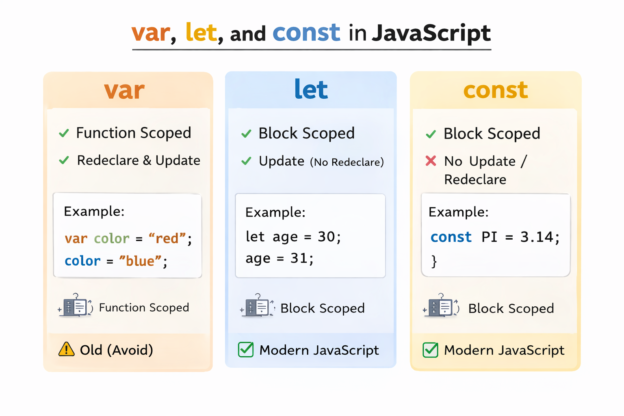
In JavaScript, there are three ways to declare variables:
-
var -
let -
const
Understanding the differences between these three is important for writing clean and modern JavaScript code.
What is a Variable?
A variable is a container used to store data.
Example:
|
1 |
let name = "John"; |
Here:
-
let→ keyword used to declare a variable -
name→ variable name -
"John"→ stored value
You can later use the variable in your program.
|
1 |
console.log(name); |
Output:
|
1 |
John |
1. var in JavaScript
var is the old way to declare variables in JavaScript.
Example:
|
1 2 |
var age = 25; console.log(age); |
Output:
|
1 |
25 |
Characteristics of var
-
Function scoped
-
Can be redeclared
-
Can be updated
Example:
|
1 2 3 4 |
var city = "London"; var city = "Paris"; console.log(city); |
Output:
|
1 |
Paris |
Because of these behaviors, var can sometimes cause unexpected bugs.
2. let in JavaScript
let was introduced in ES6 (2015) and is now widely used.
Example:
|
1 2 3 4 |
let age = 20; age = 25; console.log(age); |
Output:
|
1 |
25 |
Characteristics of let
-
Block scoped
-
Can be updated
-
Cannot be redeclared in the same block
Example:
|
1 2 |
let name = "Alex"; let name = "John"; // Error |
This makes let safer than var.
3. const in JavaScript
const is used to declare constant variables.
Example:
|
1 2 |
const pi = 3.14; console.log(pi); |
Output:
|
1 |
3.14 |
Characteristics of const
-
Block scoped
-
Cannot be updated
-
Cannot be redeclared
Example:
|
1 2 |
const age = 30; age = 40; // Error |
Block Scope Example
Block scope means the variable only exists inside the block {}.
Example:
|
1 2 3 4 5 6 |
{ let number = 10; console.log(number); } console.log(number); // Error |
The variable cannot be accessed outside the block.
Comparison Table
|
1 2 3 4 5 6 |
| Feature | var | let | const | | ---------- | -------------- | ----- | ----- | | Scope | Function | Block | Block | | Redeclare | Yes | No | No | | Update | Yes | Yes | No | | Introduced | Old JavaScript | ES6 | ES6 | |
When to Use var, let, and const
Use const
When the value should not change.
|
1 |
const country = "USA"; |
Use let
When the value may change later.
|
1 2 |
let score = 10; score = 20; |
Avoid var
In modern JavaScript, developers usually avoid using var.
Example Program
|
1 2 3 4 5 |
const name = "Emma"; let age = 25; console.log("Name:", name); console.log("Age:", age); |
Output:
|
1 2 |
Name: Emma Age: 25 |
Common Beginner Mistake
Trying to change a const variable.
|
1 2 |
const price = 100; price = 200; // Error |
Always remember:
const variables cannot be reassigned.
Summary
In this tutorial, you learned:
-
What variables are in JavaScript
-
How to use
var,let, andconst -
Differences between them
-
When to use each one
Key takeaway:
-
Use const by default
-
Use let when values change
-
Avoid var
What’s Next?
In the next tutorial, you will learn:
JavaScript Data Types Explained with Examples.